


YoYa Time: Build, Share & Play
3.81.31K Reviews
App Specs
- Version
- 2.34
- Updated On
- License
- Free
- Downloads
- 10,000,000+
- Developer
- YoYa World
- Categories
- Simulation
- Platform
- Android
Screenshots
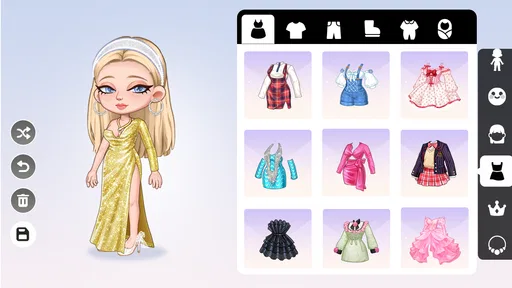



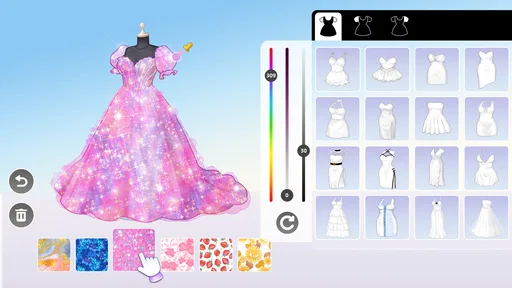
 Analysis by AppCompare
On a shared tablet, a creative game can become a small household activity: one person starts a scene, another adds a detail, and someone else turns it into a story. That is the appeal I see in YoYa Time. It is a simulation game from YoYa World built around making places and characters, then using those creations as a setting for play. Its open-ended approach works best when nobody expects a single correct way to spend a session.
A game that can fit between everyday plans
I can imagine opening it after school or during a quiet stretch at home, with a child choosing a character and a setting while a parent nearby helps shape a simple story. A short visit can be about arranging a room; a longer one can become a sequence of scenes. That flexibility is useful on a shared device because players can take turns without needing to agree on one long campaign or compete for a score.
The central question for a household is less “Who wins?” and more “What should happen next?” That makes the game a natural fit for imaginative play, but it also means it may not hold the attention of someone who wants clear goals, tightly paced levels, or a strong sense of progression. If a child prefers action challenges or a game with defined missions, a more structured alternative will probably be a better match.
Setting expectations on a shared device
Before handing over a tablet, I would decide how the household wants to manage turns and purchases. The game is free to start, with in-app purchases ranging from $0.99 to $79.99 per item, so it is sensible for an adult to handle any buying decisions and explain that optional items are not the same as a requirement to play. That conversation is more useful than assuming every child will understand purchase prompts in the moment.
For a device used by several people, separate expectations matter too. Agreeing on who may change a scene, whether creations are meant to be shared, and when it is someone else’s turn can prevent avoidable friction. I would not treat a shared creative space as automatically private or as a place for confidential information; keep personal details out of character names and story text, and supervise younger players according to the family’s usual device rules.
A practical tip is to give each player a clear role for a session: one person chooses the setting, another invents the characters, and a third suggests what happens. This keeps collaboration from turning into a tug-of-war over every choice. If someone prefers to work alone, let them finish a scene before inviting others to explore it. That small boundary protects the fun without needing to turn a relaxed game into a formal household project.
Making room for different players
Age context is worth considering even though the game is rated Everyone. That rating makes it broadly approachable, but it is not a substitute for checking whether its play style suits a particular child or for an adult’s judgment about online and purchase activity. The game’s creative focus can make it appealing to younger players, while older players may enjoy using it as a low-pressure place to stage stories. In either case, I would begin together and see what the player actually gravitates toward.
Worth Reading Before You Choose

EA SPORTS FC Mobile 26 Is a Bigger Football Game, but It Takes Time

Flipboard Shows What News Apps Must Do Beyond the Feed

Switching to Android Auto Means Rethinking Your Driving Routine

Google Calendar Makes a Crowded Week Easier to Manage

Ludo King Makes the Most of the Minutes Between Plans

Baby Panda World Brings Quick Play to Modern Phones, but Its Game Library Feels Busy
It is also useful to ask what “sharing” means in practice before a child starts exploring community-made material. A parent can set a simple rule: show an adult anything that feels confusing or uncomfortable, and do not share identifying details. This is ordinary digital common sense rather than a claim about a specific safety feature. For a younger child who needs close guidance, an adult sitting nearby is a better plan than assuming the game itself will provide every boundary a family wants.
Coordinating turns without losing the story
On a family device, the most satisfying way to use a world is often to leave a small handoff for the next person: a character with a clear problem, an unfinished room, or a choice about what should happen. The next player can continue the idea rather than starting over. If the household does not want creations changed unexpectedly, agree that a player should ask before altering someone else’s work. These habits make shared play smoother without assuming that the game has dedicated household profiles or collaboration controls.
There is a trade-off here. A shared world can produce funny surprises and unexpected plot turns, but it can also be frustrating when people have different ideas about what belongs in it. For a group that enjoys improvising, that unpredictability is part of the appeal. For a player who wants careful control over every detail, a personal creative session—or a more focused building game—may feel more comfortable.
Where it sits among simulation games
Compared with a conventional life simulator, the draw here is the emphasis on creating a setting and using it to tell small stories, rather than following a single tightly directed routine. Compared with a pure building game, the character-and-scene angle gives players a reason to imagine what happens inside the places they make. That combination is appealing when a child likes both arranging spaces and pretending, but it may feel less satisfying to someone looking for deep construction systems, complex resource management, or a competitive challenge.
One useful way to approach it is to treat each session as a tiny production: choose a location, decide who is there, and give the characters a simple goal. If inspiration runs out, browsing other players’ creations can offer a starting point; the trade-off is that outside ideas can steer the session away from a child’s own story. I would use them as prompts rather than templates, borrowing one small idea and then changing it.
What to know before installing
YoYa Time is free, has an Everyone age rating, and has an average rating of 4.0 from around 57,000 ratings, with more than 10 million installs. It was released on April 16, 2024, and version 2.33 requires Android 7.0 or later. Those figures suggest that it has reached a sizable audience, but they do not tell you whether its open-ended style will suit your household; the best test is whether the player enjoys inventing scenes without being pushed toward a fixed objective.
For a first session, I would keep the goal modest: make one setting, give it a few characters, and see whether the player naturally starts telling a story. If they do, the game has room to become a recurring shared activity. If they keep asking what they are supposed to complete, it may be kinder to choose a more goal-driven game instead. That distinction is more helpful than judging it by how much content appears available at first glance.
Unleashing Your Creativity
The first thing you'll notice when you dive into YoYa Time is its vibrant and colorful world. It's like stepping into a whimsical universe where the only limit is your imagination. The app gives you the freedom to build your own world, and trust me, it's as addictive as it sounds.
Using an intuitive drag-and-drop interface, you can create everything from cozy little homes to sprawling cities. The building mechanics are smooth, and even if you're new to this type of game, you'll find it easy to get the hang of it. Plus, there are plenty of tutorials to guide you through the process.
Sharing and Discovering
One of the standout features of YoYa Time is the ability to share your creations with others. It's not just about building for yourself; you can showcase your creativity to a community of like-minded players. And if you're feeling a bit uninspired, you can explore what others have built. The app allows you to download other players' worlds, which is a fantastic way to discover new ideas and get inspired.
This sharing capability transforms the game into a social experience. You can connect with friends, collaborate on projects, and even participate in community challenges. It's a thriving ecosystem that keeps the game fresh and engaging.
Endless Play Possibilities
Beyond building and sharing, YoYa Time offers a plethora of play options. You can embark on exciting adventures, solve puzzles, or simply explore the worlds created by others. The app continuously updates with new content and events, ensuring that there's always something new to do.
The mini-games within the app are a delightful addition. They offer quick bursts of fun and are perfect for when you have just a few minutes to spare. Plus, the rewards from these games can help you unlock new items and features for your creations.
The User Experience
One of the reasons why YoYa Time stands out is its user-friendly interface. The developers have done a fantastic job of creating a seamless experience. Navigating through the app is a breeze, and the controls are responsive and easy to use.
The graphics are another highlight. The vibrant colors and detailed designs give the game a charming and inviting look. It's clear that a lot of thought and effort went into the visual design, making it a joy to explore the worlds within the app.
In terms of performance, the app runs smoothly on both Android and iOS devices. I didn't encounter any significant bugs or crashes during my time with it, which is always a plus.
Final Thoughts
In a world full of apps and games vying for your attention, YoYa Time manages to carve out a special place. It's not just a game; it's a platform for creativity, collaboration, and endless fun. Whether you're building your dream world, exploring others' creations, or tackling mini-games, there's something here for everyone.
If you're looking for an app that offers a mix of creativity, social interaction, and entertainment, give YoYa Time a try. It's a delightful escape that's sure to captivate your imagination and provide countless hours of enjoyment. So go ahead, download it, and start building your world today!
Pros
- User-friendly interface enhances gameplay.
- Wide variety of creative tools available.
- Engaging community for sharing creations.
- Regular updates with new features.
- Supports offline play for convenience.
Cons
- Limited free content without purchases.
- Occasional lag on older devices.
- Advertisements can be intrusive.
- Some features require in-app purchases.
- Initial setup process is time-consuming.
FAQs for YoYa Time: Build, Share & Play
What is YoYa Time and how does it work?
YoYa Time is a creative platform where users can build their own virtual worlds, share them with others, and explore creations made by the community. The app provides a variety of tools and resources that allow users to design unique environments and characters, encouraging creativity and interaction among players.
Is YoYa Time suitable for children?
Yes, YoYa Time is designed to be family-friendly and is suitable for children. The app includes parental controls and safety features to ensure a secure environment. Additionally, the content is moderated to maintain a safe space for younger audiences, fostering creativity and learning in a fun way.
Are there in-app purchases in YoYa Time?
YoYa Time offers in-app purchases that allow users to access additional features, tools, and decorations for their creations. While the app can be enjoyed without spending money, these purchases enhance the experience by providing more customization options and exclusive content.
Can I play YoYa Time offline?
YoYa Time requires an internet connection to access most of its features, such as sharing creations and exploring content made by others. However, users can still work on their own projects offline and save their progress to be uploaded once they reconnect to the internet.
What devices are compatible with YoYa Time?
YoYa Time is available for both Android and iOS devices. It supports a wide range of smartphones and tablets, but it is recommended to check the app's compatibility with your specific device model and operating system version to ensure smooth operation and the best experience.


